





21 Casino
21 Casino App: Get It on Your Phone and Play
Nigerian players can open casino games on a phone or tablet through the 21 casino app with little effort. A dedicated APK is available for Android. iPhone and iPad owners play on the mobile website, because no dedicated iOS application exists right now.
The mobile option also supports account access, game selection, deposits, withdrawals, and other account functions. Before installing anything, players should check that the download source is the official 21 Casino Nigeria website.
The App in Short
The 21 casino mobile app puts casino access in your pocket, so you do not need a desktop. Registered users can open games and handle their account from a smartphone or tablet.
For Android users, the app is distributed as an APK rather than through a confirmed App Store listing. The same account can be used for casino and sportsbook activity, so existing customers do not need to create a separate mobile profile.
While away from a computer, the mobile option is handy for checking an account, browsing available games and reaching other services.
Android Download
The 21 Casino website does offer a dedicated Android APK. For Android owners who prefer an installed app to a browser, the 21 casino app Nigeria route fits well.
The installation route is based on an APK download. For safety, the file should be obtained from the official website rather than an unknown third-party source offering a casino APK download.
Before installing, make sure the phone has free storage and a stable internet connection. The official site is the place to look for the newest version.
iOS Users and the App
Right now iPhone and iPad have no dedicated app. Searching for a 21 casino app iOS does not prove that an App Store listing exists.
Instead, iPhone and iPad users can access the mobile-optimized 21 Casino website through a browser. This provides access to mobile casino functions without requiring a native iOS app.
Apple device owners who want a 21 casino app should rely on the official website and not download an unofficial application from an outside source.
Downloading the App
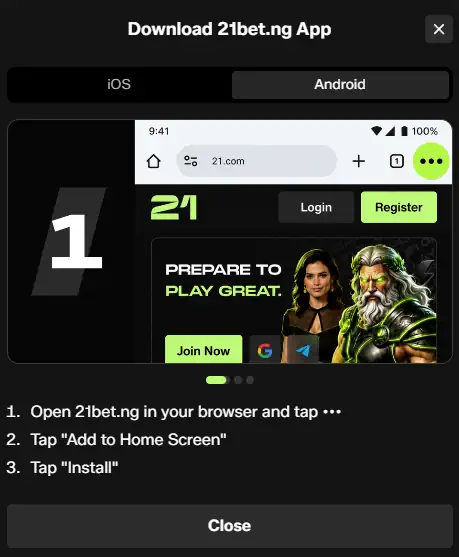
Through the official 21 Casino website you can complete the 21 casino app download for Android. In general it goes like this:
- On your Android device, go to the official 21 Casino website.
- Find the section that provides the Android application.
- Start downloading the APK from the official source.
- Wait for the file to finish downloading.
- Tap the finished file to begin installing.
Download controls can change in wording and position as the website is updated, so it is better to follow the current instructions shown on the official site.
For iOS users, no app download is required. Opening the mobile version of the website in a browser is the alternative.
21 Casino
Setup and Sign-In
Once the 21 casino APK has finished downloading, open it and go through the prompts on your device. Because the app does not come from the standard app marketplace, Android may ask for permission first.
Only proceed when the APK came from the official 21 Casino website. Avoid files shared through unofficial download pages or unknown sources.
Launch the app after installation and enter your existing credentials. The 21 casino app login works with the account created for the 21 Casino service, so current customers register only once.
When the app does not accept your login details, recheck what you typed and use the site’s account-recovery or support options if needed.
What the Mobile App Offers
Access from smaller screens is the point of the 21 casino mobile app. An installed application means you do not have to keep opening a browser and typing in the website address.
Typical mobile functions are:
- Casino games on a smartphone
- Account login and profile management
- Deposits and withdrawals
- Access to casino and sportsbook services
- Navigation built for mobile
- Regular access without a desktop computer
Android users can choose between the app and the mobile browser, whichever they like better. The 21 Casino review also notes that the mobile website is optimized for smartphones and tablets.
Games Available in the App
Several major casino categories sit in the mobile catalogue. Availability permitting, mobile devices can open slots, table games, crash games, live casino titles and interactive game shows.
Classic tables such as roulette, blackjack and baccarat are there, plus slots and fast crash-style games.
Because the catalogue changes, check the current mobile lobby to see what a given device can open. Some titles may differ on mobile.
App Promotions
Offers linked to deposits, gameplay or loyalty activity may be available to customers of 21 Casino. Mobile users should read the current promotion terms before claiming anything.
Downloading the 21 casino app does not by default unlock a separate mobile-only bonus. Whether you qualify depends on the promotion itself and its terms.
Terms might cover wagering requirements, qualifying deposits, expiry periods and further restrictions. Read them before you take part, and an offer will not surprise you.
Troubleshooting
Problems with a 21 casino APK installation or mobile access can often be addressed with a few basic checks:
- Check that the download finished properly.
- Check available device storage.
- Use a steady internet connection.
- Restart the application if it stops responding.
- Check the official site for a newer application version.
- Reinstall the application if the installation appears incomplete.
- Get in touch with customer support if account or payment problems carry on.
For browser access, refreshing the page or reopening the mobile site can also help with temporary loading problems.
Popular games at 21 Casino






FAQ
Is the 21 Casino app free to download?
Does the 21 Casino app work on all phones?
How do I update the 21 Casino app?
Can I use the same account on the app and website?
Is the 21 Casino app safe to install?
21 Casino